
Real estate virtual staging softwareStaged, not changed.
Built for real-estate photographers, by a real-estate photographer. No prompts to write: pick the room and style, stage the whole listing, then review each result against the original before you approve it. Offer it to your agents as a paid add-on.
For Windows and Apple Silicon Mac. A card is required to start, and you're charged when the 30-day trial ends unless you cancel first. Launch pricing Founding Members: $5/month or $50/year, locked in while subscribedBuilt to keep the architecture
Staging rules are designed to keep walls, windows, floors and fixtures as photographed. AI can still change details, so review every image before approving.
No per-photo fees from us
One flat subscription for StagingLens. OpenAI bills each generated image, retry and revision to your own OpenAI account.
Disclosure options
Export a clean image and disclose in your listing, or add on-image text such as “VIRTUALLY STAGED” in your own wording.
JPG exports
Export staged photos as JPG files. Check the dimensions against your listing platform's requirements.

Virtual staging on real listings
Every example below is a real listing photo. Drag across each one to see what changed and what didn't.


Empty living room, furnished and staged
A living room with a brick fireplace, virtually furnished with a sectional sofa, coffee table and rug.


The seller's furniture, restyled
The bed, nightstand and shelving stay. The bedding and soft goods get refreshed.


Powder room, depersonalized
Personal items swapped for neutral towels and simple decor. Fixtures untouched.


Occupied kitchen, cleared
Counters decluttered, the table set, and the living room beyond staged to match.


Primary suite, furnished
Leftover dressers replaced with a full bedroom setup. The doorway to the bath stays clear.


Empty guest room
A vacant bedroom furnished at a realistic scale for the space.


Entry, from empty
A console, mirror and runner that leave the path to the door open.
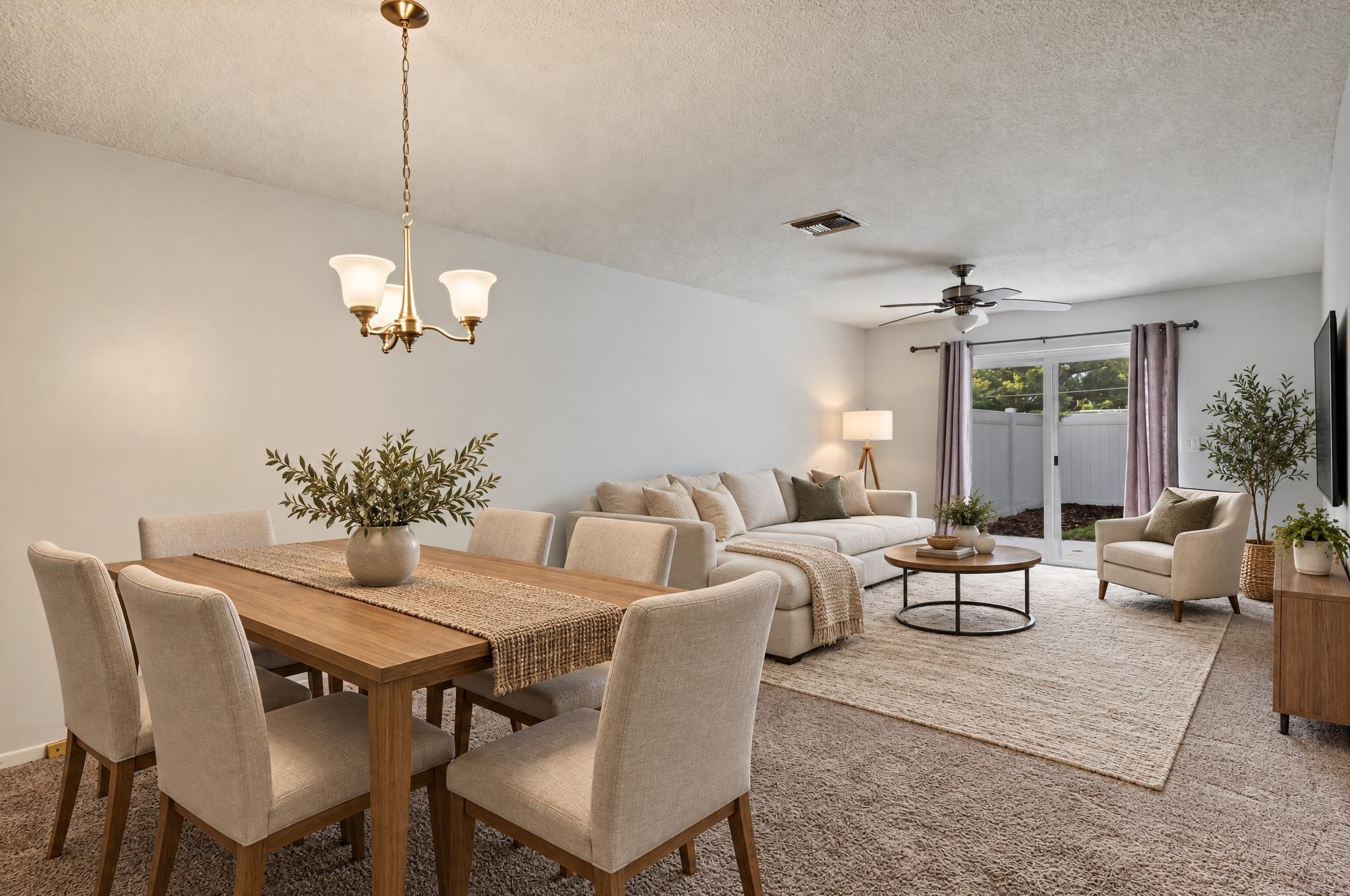
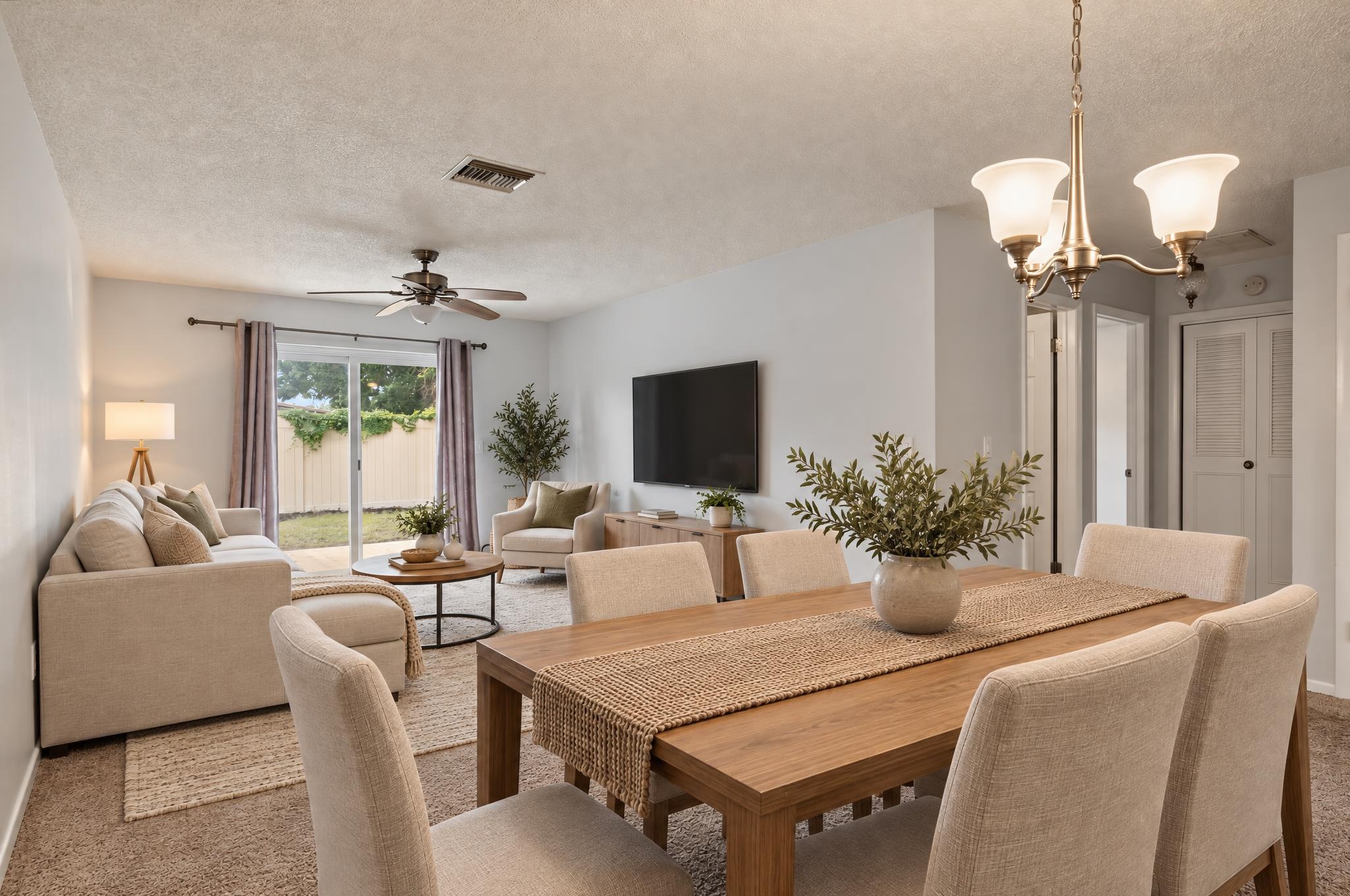
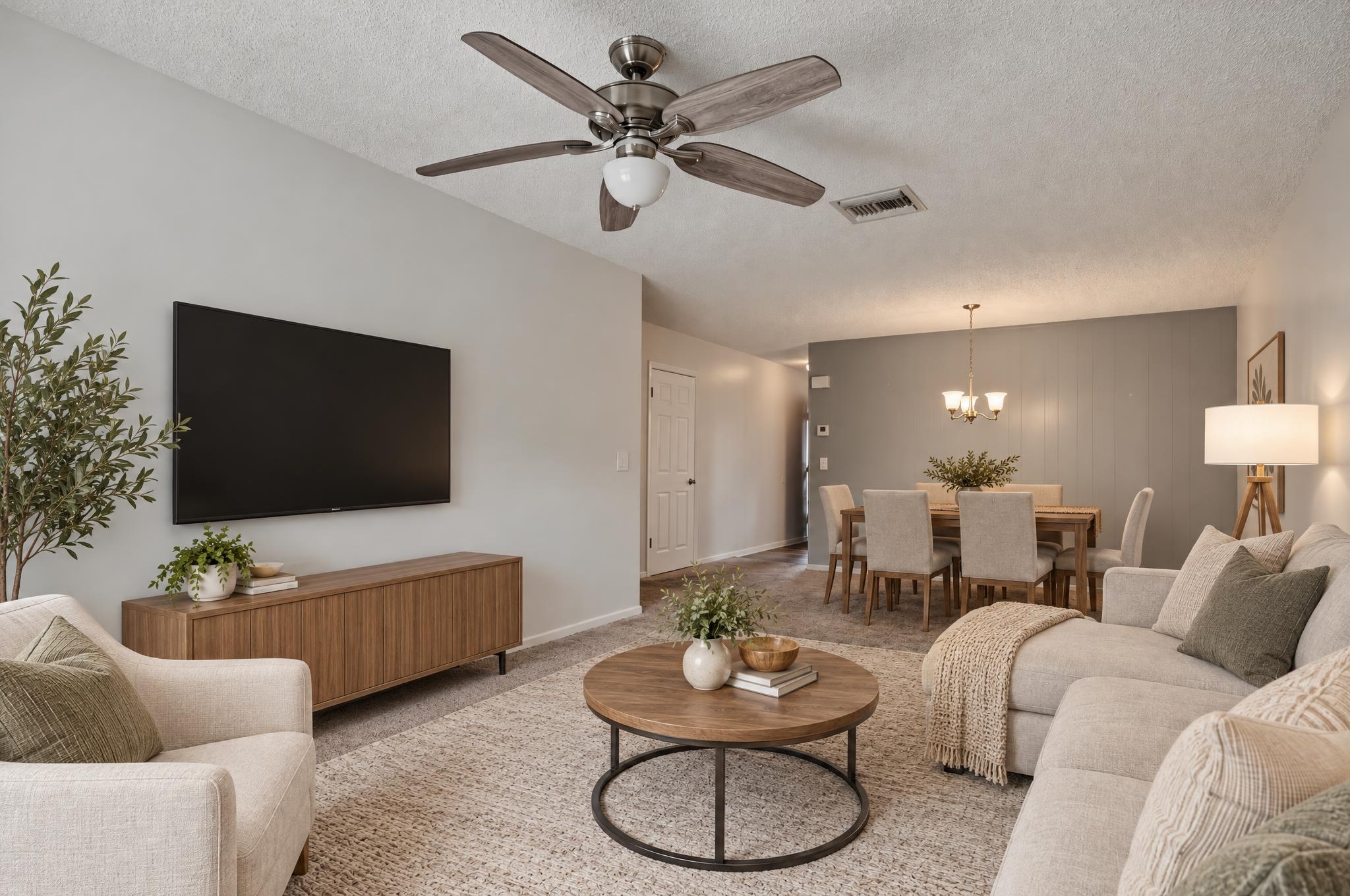
One room. Multiple angles. A cohesive look. Beta
Stage multiple photos of the same room with a coordinated look across different views. Help buyers picture how the space comes together, from more than one perspective.
Group two to four photos of the same room and choose a primary angle. Generate and approve the primary design; StagingLens then generates the additional views from that reference. Review each result before approving or delivering it. Learn how multi-angle staging works
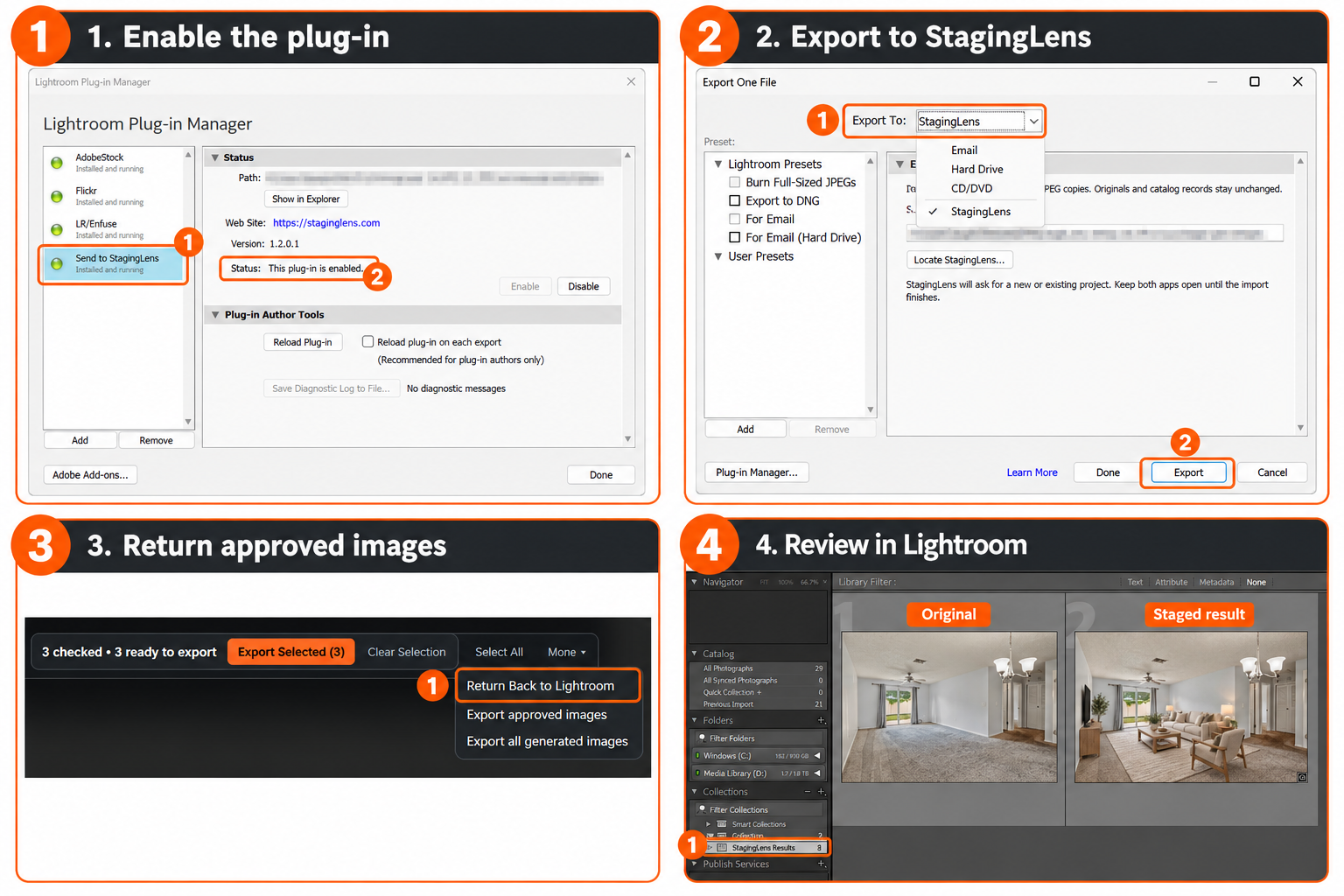
From Lightroom Classic and back.
Skip the export-to-a-folder, import-again routine. Send your edited photos straight into StagingLens, and approved results return to the same Lightroom catalog on their own.
Send from Lightroom
Select your edited photos and export them to StagingLens from Lightroom Classic.
Stage
Choose room type and style and stage the set, just like any other project.
Review and approve
Check each result. Only images you approve go back.
Return to Lightroom
Approved images arrive in your catalog in a StagingLens Results collection.
- Set it once per project. Choose Return Back to Lightroom, and from then on approved images and approved revisions return automatically to the catalog they came from.
- Your originals stay untouched. Staged images arrive as separate photos in a StagingLens Results collection. Original photos and your Lightroom edits are preserved.
- Safe return processing. Reprocessing the same return bundle does not duplicate it. An intentional repeat send can create a new copy.
- Approval stays with you. Generating an image doesn't send it anywhere. Nothing returns until you approve it.
What stays put
Generic AI staging moves walls, invents windows and parks sofas in doorways. StagingLens is built around the rules a listing photo has to follow.
The architecture
The staging rules are designed to keep walls, windows, doors, flooring, ceiling fans and vents as photographed. Always compare the result with the original.
Clear paths
The rules aim to keep doorways and walkways open and to size furniture for the room.
Occupied or vacant
Clear out clutter and toys first, restyle the furniture that's there, or furnish an empty room.
Multiple angles
Connect up to four views of the same room so they follow one approved design. See what to expect.
How it works
Set up once, then stage a whole listing in a single batch.
Install StagingLens
Download the app for Windows or Apple Silicon Mac and activate it with your license key.
Add your OpenAI key
Paste in your OpenAI API key. It's stored on your computer, not on our servers. Your API account needs its own billing, separate from any ChatGPT subscription. See how to set it up.
Stage the batch
Drop in your photos, or send them from Lightroom Classic, then choose each room type and a style and stage them all at once. No prompts to write.
New to OpenAI API keys? The setup and troubleshooting guide walks you through creating a key, setting up billing and fixing common errors.
Customize any photo, or none at all
The built-in staging rules handle most rooms on their own. When a photo needs something specific, adjust just that one without touching the rest of the listing.
Room type
Set each photo as a bedroom, living room, kitchen, bathroom, patio, loft and more, so the furniture fits the space.
Style and color
Pick a style like Modern, Coastal or Luxury contemporary, then a color palette to match the listing or the agent's brand.
Task
Stage an empty room, declutter and then stage, or declutter only and keep the furniture that's there.
Your own instructions
Add a note for any photo, like "family room on the right, dining on the left" or "keep the existing couch."
Retry and revise
Retry a result or describe a revision. Every version is saved so you can compare them and approve the best one.
Batch style
Apply one furniture style, color palette and artwork style to many photos at once, then generate the checked photos.
Exterior Sunset
Turn a daytime exterior into twilight, sunset or night. It's designed to keep the house and framing the same, so compare it with the original before you approve it.
Fix one detail
Select an area of a staged photo and describe the change. Each edit is a separate OpenAI request.
You pay OpenAI directly, with no markup
StagingLens runs on your own OpenAI account. Image costs go straight to OpenAI at their rates, and your StagingLens plan stays the same no matter how many photos you stage.
OpenAI bills image generation to your own account. Costs vary with the model, settings, input images and number of attempts. Each additional room view, retry or revision adds another image request. Changing settings and approving an existing result do not generate images.
API billing is separate from ChatGPT. ChatGPT subscriptions, including Plus and Pro, don't include API credits, so you'll add a payment method or prepaid credits on the OpenAI API platform before staging.
Review usage and budget settings in your OpenAI account. Budget alerts are notifications, not guaranteed hard spending caps. Your photos go from your computer to OpenAI for processing.
Add staging to your photo packages
Offer virtual staging to your agents as a paid add-on, without outsourcing it or waiting days for a staging company.
Stage a listing the same day you edit the photos, and deliver both together.
Virtual staging costs compared
Pay OpenAI's cost for each photo, one flat fee for the app, and control every detail of how a room is staged.
Swipe the table sideways to compare →
| Feature | StagingLensYour OpenAI key + flat fee | Human-edited servicese.g. BoxBrownie | AI subscription toolsMonthly photo allowance | AI credit packsPay per credit |
|---|---|---|---|---|
| Cost per photo | Usage-based, billed by OpenAI | $24 to $30 | About $1 on entry plans | $0.28 to $0.95 |
| Monthly fee | $5/month or $50/year for Founding Members, regular $9/month or $90/year.$9/month or $90/year. Unlimited photos | None, pay per photo | From about $19, with a monthly photo cap | None, buy credit packs |
| A 15-photo listing | Depends on usage and attempts | $360 to $450 | About $14, and most of a month's allowance | $4 to $14 |
| Re-tries and revisions | Separate image charges from OpenAI | Handled case by case | Each one uses up your allowance | Each one uses a credit |
| Customization | Per photo: room type, task (stage empty, declutter + stage, declutter), style, color palette and artwork, plus your own written instructions like "keep the existing couch" | Written notes to a designer, then wait for the edit | Preset styles; options vary by tool | Preset styles; options vary by tool |
| Turnaround | Minutes, a whole listing in one batch | 24 to 48 hours | Seconds to minutes | Seconds to minutes |
| MLS disclosure | Built in: clean image for listing disclosure, or on-image disclosure text | Varies | Varies | Varies |
Competitor prices are typical published rates from 2026 pricing pages and industry guides and may change. StagingLens photo costs are based on our own usage at OpenAI's current rates and are billed by OpenAI to your own account; your actual cost depends on OpenAI's pricing and how many re-tries you run.
Compare in detail: StagingLens vs BoxBrownie · StagingLens vs Fotello · StagingLens vs per-photo AI tools
Pricing
Every new subscription starts with a 30-day free trial. Founding Members lock in $5/month or $50/year.
$5/month
Locked in for as long as you're subscribed
Regular price: $9/month for new subscriptions after the offer ends on December 31, 2026, or the 30 monthly places fill, whichever comes first.
- 30-day free trial
- Unlimited staging on your own OpenAI key (API usage billed separately)
- Mac (Apple Silicon) and Windows
- All room types and styles
- Updates as OpenAI models change
- New features and staging improvements
- Email support
$50/year
Locked in for as long as you're subscribed
Regular price: $90/year for new subscriptions after the offer ends on December 31, 2026, or the 30 annual places fill, whichever comes first.
- 30-day free trial
- Unlimited staging on your own OpenAI key (API usage billed separately)
- Mac (Apple Silicon) and Windows
- All room types and styles
- Updates as OpenAI models change
- New features and staging improvements
- Email support
Founding Member prices stay locked for as long as the subscription stays active.
$9/month
Also available at $90/year. OpenAI usage is billed separately.
- 30-day free trial
- Unlimited staging on your own OpenAI key (API usage billed separately)
- Mac and Windows
- All room types and styles
- Updates as OpenAI models change
- New features and staging improvements
- Email support
What your plan covers
- Keeping up with OpenAI. When OpenAI updates, renames or retires an image model, StagingLens is tested and updated so your staging keeps working.
- Better results over time. The staging rules keep getting refined on real listings, and improvements arrive in app updates.
- New features and updates for Mac and Windows.
- Email support.
What OpenAI charges for
The images themselves, billed directly to your own OpenAI account with no markup. Additional views, retries and revisions incur separate image charges.
You control that spending in your OpenAI account. Budget alerts there are notifications, not guaranteed hard caps.
Checkout, billing and license keys are handled by Creem as our merchant of record. You'll also need OpenAI API billing set up. It's separate from ChatGPT, and ChatGPT subscriptions don't include API credits. The setup guide walks you through it.
Disclosure, your way
Every export asks how the images should be labeled, so you can match your MLS rules:
Some states and MLSs require a label on the image itself. California, for example, requires a clear label plus a way for buyers to see the original photo, so add on-image disclosure text there. Keep the unstaged originals on file.
Virtual staging questions
Something else? Contact support.
Can I try StagingLens now?
Yes. Every new subscription starts with a 30-day free trial. A card is required to start, and you're charged when the trial ends unless you cancel first. If it isn't for you, ask within 14 days of your first charge for a full refund. Try Free for 30 days
Who is StagingLens not for?
It's built for people who stage their own listing photos on a desktop computer. It isn't the right fit if you'd rather have a person do the staging for you, need a phone or web app, or don't want to set up an OpenAI API account. It also isn't available for Intel Macs or as a native Windows on ARM download.
What will a Founding Member pay?
The founding price is $5/month or $50/year, for as long as the subscription stays active. The regular price is $9/month or $90/year.
Who will qualify for Founding Member pricing?
Anyone who starts a free trial on or before December 31, 2026, while spots remain. The offer is limited to 30 members per plan: 30 Founding Monthly Members and 30 Founding Annual Members.
Do I need to pay anything else?
StagingLens runs on your own OpenAI API key, so OpenAI bills you directly for image generation. Costs vary with settings and attempts; additional views, retries and revisions are billed separately. There's no markup from us, and the setup guide walks you through creating your key.
What happens if I cancel?
Your Founding Member rate ends when you cancel. If you come back later, you'll subscribe at the regular price at that time. Cancelling stops future charges, and you keep access until the end of the period you've paid for.
What's the regular price?
The regular price is $9/month or $90/year for new customers starting January 1, 2027.
Do I need to write prompts?
No. The staging rules are built in. Choose the Room, Task and Look; the optional Instructions field handles one-off requests like "keep the existing couch." Review every result before approving it.
What do I need to use StagingLens?
A Mac or Windows computer and an OpenAI account with API billing turned on. Creating an API key takes a few minutes, and the setup guide shows every step.
Does my ChatGPT Plus subscription cover it?
No. ChatGPT and the OpenAI API are billed separately, and ChatGPT subscriptions, including Plus and Pro, don't include API credits. Add a payment method or prepaid credits on the OpenAI API platform (platform.openai.com), and check that your project's spending limit isn't set to $0. OpenAI may also ask you to verify your organization or identity before image generation is available; if it does, complete that in your OpenAI Platform account. If staging fails with a billing or access message, one of these is almost always the cause.
How much does each photo cost?
OpenAI bills each generated image to your own account, separately from your StagingLens plan. Cost depends on the model, settings, input images and number of attempts. Retries, revisions and additional views are separate paid image requests. Check your OpenAI usage and billing controls.
What size are the staged files?
StagingLens exports JPG files. Check the exported image dimensions against your listing platform's requirements.
Are the staged photos MLS-ready?
The staging rules are designed to keep the architecture as photographed, but AI can still change details, so review every image. You choose the disclosure when exporting: a clean image with disclosure in your listing, or on-image disclosure text in your own wording. Some states and MLSs, including California, require a label on the image and access to the original photo, so check your local rules and keep the unstaged originals.
Will every angle match exactly?
Not reliably, which is why multi-angle staging is in beta. Matching a furnished room across different camera angles remains challenging for generative AI. StagingLens uses your approved primary design to guide additional angles, but it doesn't guarantee a geometrically consistent 3D reconstruction of the room: furniture may move, rotate, change or disappear between views. Review every angle together before delivery. Local edits can help correct individual details, but additional paid attempts may be needed and a satisfactory match is not guaranteed. How multi-angle staging works
How many angles of a room can I connect?
Up to four: one primary design and up to three additional views of the same room. Multi-angle staging is in beta.
Does StagingLens work with Lightroom Classic?
Yes, with the StagingLens plug-in for Lightroom Classic included with the app. Send edited photos from Lightroom into StagingLens, then stage, review and approve them.
Do staged photos go back to Lightroom automatically?
After you choose Return Back to Lightroom for the project, approved images and approved revisions return automatically to the catalog the photos came from. Generating an image doesn't send it back; only approved images return. Lightroom Classic must be open with that catalog, and the updated plug-in must be enabled.
Will the round trip change my originals or Lightroom edits?
No. Staged images arrive as separate photos in a StagingLens Results collection. Your original photos and Lightroom edits are preserved, and the same result isn't imported twice.
I approved an image. Why isn't it in Lightroom yet?
Returned images take a few moments to appear in the Library. Make sure Lightroom Classic is open with the catalog the photos came from and the updated StagingLens plug-in is enabled.
Where do my photos go?
Ordinary staging sends photos from your computer directly to OpenAI using your own API key, and the results come back to your computer. We don't receive those photos. We only receive photos or reports you choose to send us for support. See the privacy policy.
Why is there a monthly fee if I pay OpenAI for images?
OpenAI charges for generating the images. Your StagingLens plan pays for the app itself and for keeping it working: updating it whenever OpenAI changes its models, refining the staging rules, adding features, and support.
Is StagingLens made by OpenAI?
No. StagingLens is an independent product of Nona Video LLC that uses OpenAI's image models through your own account.
System requirements
StagingLens runs on 64-bit Windows 11 PCs and Apple Silicon Macs. Image generation happens in OpenAI's cloud, so you don't need a powerful graphics card. You need Windows 11 version 24H2 or later, or macOS 14 Sonoma or later on an M1 or newer Mac, plus your own OpenAI API key with billing enabled.
See full Windows and Mac requirements
Windows requirements
- Processor
- 64-bit Intel or AMD processor (x64). A native Windows ARM download is not currently available.
- Operating system
- Windows 11, version 24H2 or later
- Memory
- 16 GB RAM recommended, particularly when running Lightroom Classic alongside StagingLens
- Storage
- Approximately 160 MB for the app. Allow at least 500 MB of free space for downloading and extracting it, plus additional space for photos, generated images and saved projects.
- Internet
- Required for activation, license validation and AI image generation
- StagingLens license
- A valid purchased StagingLens license
- OpenAI account
- Your own OpenAI API key, enabled API billing and access to the image models used by StagingLens
- Lightroom
- Optional. Adobe Lightroom Classic is required only for the included plug-in. The cloud-based Lightroom app is not supported by the plug-in.
Windows installation: Extract the entire ZIP before opening StagingLens. Keep the executable and its supporting files together. No separate .NET installation or developer tools are required.
Mac requirements
- Processor
- Apple Silicon: M1 or newer. This download does not support Intel Macs.
- Operating system
- macOS 14 Sonoma or later
- Memory
- 16 GB RAM recommended, particularly when running Lightroom Classic alongside StagingLens
- Storage
- Allow at least 500 MB of free space for downloading and extracting the app, plus additional space for photos, generated images and saved projects.
- Internet
- Required for activation, license validation and AI image generation
- StagingLens license
- A valid purchased StagingLens license
- OpenAI account
- Your own OpenAI API key, enabled API billing and access to the image models used by StagingLens
- Lightroom
- Optional. Adobe Lightroom Classic is required only for the included plug-in. The cloud-based Lightroom app is not supported by the plug-in.
Mac installation: No separate .NET installation, Xcode or developer tools are required.
For both platforms
- AI image generation runs through OpenAI's cloud service. A dedicated NVIDIA graphics card is not required.
- The 16 GB memory recommendation is guidance, not a benchmarked minimum. Storage needs increase with project size and the number of saved versions. If using Lightroom Classic, your computer must also meet Adobe's requirements.
- ChatGPT Plus or Pro is not required and does not include API credits. OpenAI image-generation usage is billed separately from your StagingLens subscription. Additional views, retries and revisions can incur additional charges. OpenAI billing explanation.
- For your reference: Windows 11 24H2 is the current fully supported Windows target of the app's UI framework; that does not mean we have tested every Windows configuration. Platform support.
Start staging with a 30-day free trial.
Every new subscription starts with a 30-day free trial. A card is required to start.
Try Free for 30 days